The Quest for Local Weather Data
Anyone can check a weather app and see what temperature it is. Well, what you can’t do is figure out what temperature it is inside your own apartment. You might have a smart thermostat that can track and set a temperature, but can you trust how accurate that is? I certainly don’t. And a smart thermostat like Nest will only show you a limited amount of history at 1 hour granularity. What if you want more? Like minutely data for the past year? Guess I’ll just have to do it myself.
The Hardware
Actual embedded development was a little too intimidating, so I went with a Raspberry Pi 5. Actually 3, because I want the weather in multiple locations in my apartment and in my office.
Sensors
This project started with just a BME688 for basic temperature and humidity monitoring, but it quickly expanded to include all the sensors I could find on Adafruit:
| Sensor | Voltage | Current (mA) | What it provides |
|---|---|---|---|
| PMSA003I | 3.3/5V | 100 | Particulate matter (air quality) |
| SCD-41 | 3.3/5V | 17 | CO2. |
| TSL2591 | 3.3/5V | 0.4 | Light levels |
| BME688 | 3.3/5V | 1 | Gas, pressure, temp, humidity |
Voltage and current is foreshadowing future issues.
Wiring
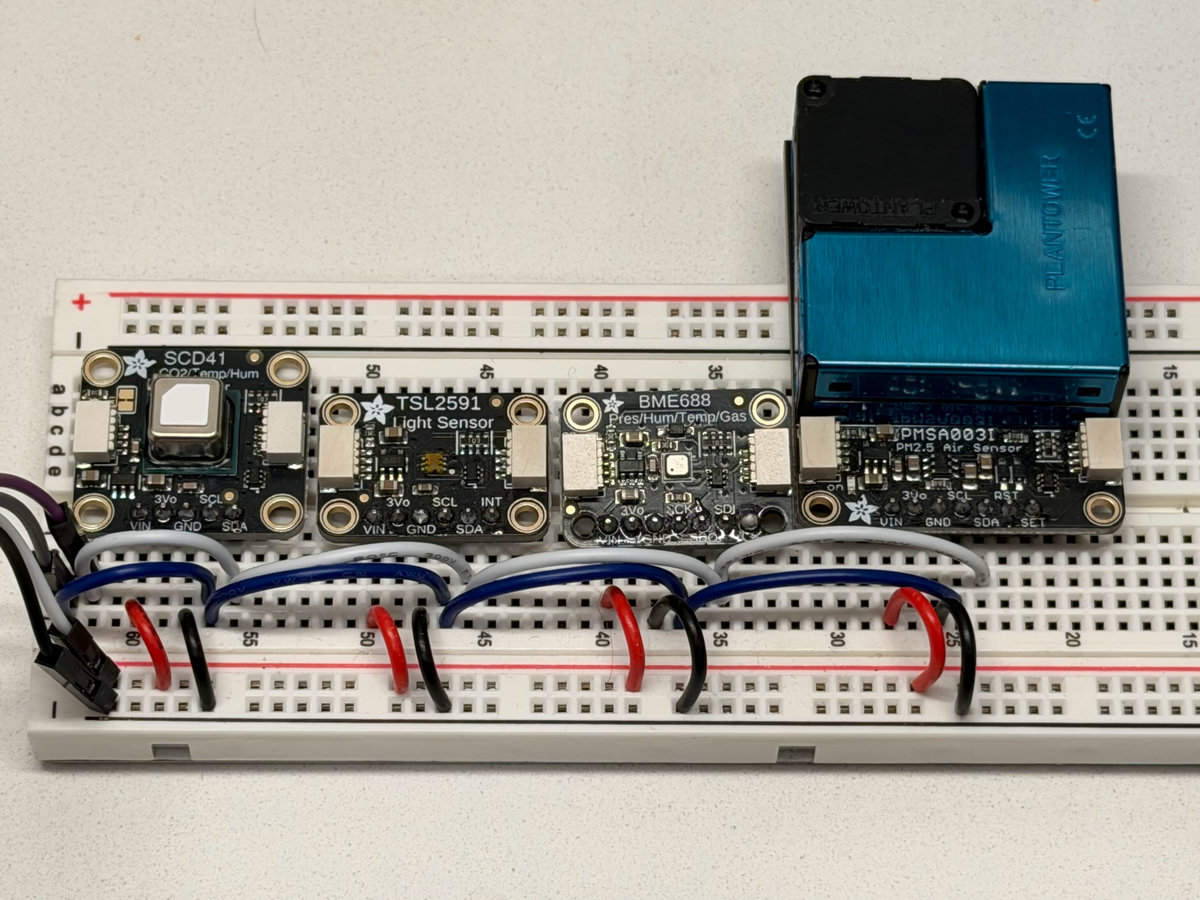
The software
The first version of the weather station was a simple python script. Adafruit provides fantastic python libraries for all the sensors I was using. As my first time working with I2C, this seemed like the Golden Path.
Debugging I2C issues, take 1
The weather station worked for a while. But occasionally weird things would show up. Some sensors would stop showing up, while others would get stuck on a particular value. Restarting the data collection process wouldn’t fix these issues, the only solution was rebooting the Pi.
hot_pi exited with code 1 (restarting)
hot_pi  | Traceback (most recent call last):
hot_pi  |   File "//app.py", line 13, in <module>
hot_pi  |     from hot_pi.seattle_weather import SeattleWeather
hot_pi  |   File "/hot_pi/seattle_weather.py", line 6, in <module>
hot_pi  |     from hot_pi.sensor import Sensor
hot_pi  |   File "/hot_pi/sensor.py", line 4, in <module>
hot_pi  |     import adafruit_bme680
hot_pi  |   File "/usr/local/lib/python3.10/dist-packages/adafruit_bme680.py", line 51, in <module>
hot_pi  |     from digitalio import DigitalInOut
hot_pi  |   File "/usr/local/lib/python3.10/dist-packages/digitalio.py", line 27, in <module>
hot_pi  |     from adafruit_blinka.microcontroller.bcm2712.pin import *
hot_pi  |   File "/usr/local/lib/python3.10/dist-packages/adafruit_blinka/microcontroller/bcm2712/pin.py", line 8, in <module>
hot_pi  |     D0 = Pin((4, 0))
hot_pi  |   File "/usr/local/lib/python3.10/dist-packages/adafruit_blinka/microcontroller/generic_linux/libgpiod/libgpiod_pin_2_x.py", line 34, in __init__
hot_pi  |     self._chip = gpiod.Chip(chip_id)
hot_pi  |   File "/usr/local/lib/python3.10/dist-packages/gpiod/chip.py", line 58, in __init__
hot_pi  |     self._chip = _ext.Chip(path)
hot_pi  | FileNotFoundError: [Errno 2] No such file or directory
hot_pi  | Exception ignored in: <function Pin.__del__ at 0x7fff84b5b130>
hot_pi  | Traceback (most recent call last):
hot_pi  |   File "/usr/local/lib/python3.10/dist-packages/adafruit_blinka/microcontroller/generic_linux/libgpiod/libgpiod_pin_2_x.py", line 38, in __del__
hot_pi  |     if self._line_request:
hot_pi  | AttributeError: 'Pin' object has no attribute '_line_request'
I considered elaborate monitoring solutions with hooks to reboot any misbehaving Pis. But I convinced myself it was Python and/or the Adafruit SDKs, thus the great Rust re-write began. In hindsight, I should have realized it was a hardware issue since the only way to fix the issue was to reboot the Pi.
The great Rust rewrite
I had dabbled with Rust for years, but nothing major. I knew Rust had the performance I needed to collect high precision weather events in my apartment every minute. Thanks to having already written the first version in Python I had a good sense of the architecture I wanted:
- Generic sensor trait that I can use to create a list of sensors and iterate over
- Store all data in a local file, and only delete once it’s been uploaded successfully
- Initially I thought about implementing everything myself, but decided to be
lazy and use existing crates for sensor communication:
bosch-bme680,scd4x,pmsa003i, andtsl2591-eh-driver
After the quick rewrite everything was running smooth and efficiently (sipping CPU cycles and just 14 mb of memory). All I had left to do was wait and see if the problem was fixed.
Debugging I2C issues, take 2
At first the Rust re-write seemed much more stable. But then tragedy struck, the sensors started to fail again. Had I wasted hundreds of dollars (CO2 sensors are expensive, especially when you buy 3 of them) for nothing? Would I ever get to the bottom of what temperature and humidity my apartment is? Would I slowly die from CO2 poisoning and not realize it?
But there in the Rust logs was a new clue:
2026-01-28T06:32:51.815211Z  INFO Polling sensors...
2026-01-28T06:32:51.826657Z ERROR Error polling bme680: Failed to get sensor data: WriteReadError(I2CError { err: Errno(121) })
2026-01-28T06:32:51.836693Z ERROR Error polling tsl2591: Failed to read TSL2591 channels: I2cError(I2CError { err: Errno(121) })
2026-01-28T06:32:56.298361Z ERROR Error polling scd41: Failed to get measurement: I2c(I2CError { err: Errno(5) })
2026-01-28T06:32:56.298436Z ERROR Error polling pmsa003i: Failed to read PMSA003I sensor: I2C(I2CError { err: Errno(5) })
Errno(121) is EREMOTEIO and 5 is EIO which are both related to communication
issues with the I2C devices which is exactly what’s happening, but why? The 4
boards were still showing up according to i2c-detect:
sudo i2cdetect -y 1
     0  1  2  3  4  5  6  7  8  9  a  b  c  d  e  f
00:                         -- -- -- -- -- -- -- --
10: -- -- 12 -- -- -- -- -- -- -- -- -- -- -- -- --
20: -- -- -- -- -- -- -- -- -- 29 -- -- -- -- -- --
30: -- -- -- -- -- -- -- -- -- -- -- -- -- -- -- --
40: -- -- -- -- -- -- -- -- -- -- -- -- -- -- -- --
50: -- -- -- -- -- -- -- -- -- -- -- -- -- -- -- --
60: -- -- 62 -- -- -- -- -- -- -- -- -- -- -- -- --
70: -- -- -- -- -- -- -- 77
The smoking gun showed up in the kernel logs:
[336495.416190] i2c_designware 1f00074000.i2c: i2c_dw_handle_tx_abort: SDA stuck at low
Searching around for this issue quickly points to a hopefully easy fix:
- Pull-up resistors for SDA/SCL to compensate for the allegedly weak ones built into Pis
- Decoupling capacitors to smooth out power noise when the PMSA003I fan starts or SCD-41 heating element turns on
Up next, the circuit gets an upgrade.